Working with debiting retry attempts
Overview
Introduction
If a scheduled automatic debiting is declined, for example, in case when the customer's account has insufficient balance, initiating this debiting can be attempted again in the Flashpay payment platform after a certain time period. You can add this capability for specific projects and for a specific group of payment methods upon agreement with your Flashpay account manager. Note that the merchant is responsible for notifying the customers that this functionality is being used, specifically when a scheduled debiting was declined and retry attempts have been set up.
When retry attempts are used for COF purchases, their number and the time allocated for making them are limited: for each scheduled debiting there can be no more than 7 retry attempts carried out within 6 days. The time interval between an initial debiting and the first retry attempt as well as between the first and the second retry attempts equals 12 hours. The rest of the retry attempts are carried out every 24 hours. Along with that, it is checked that according to the debiting schedule the next debiting is to occur at least 12.5 or 24.5 hours after the retry attempt. If not, the retry attempts are halted. These restrictions are applicable to all payments within any project and cannot be modified in any way.
If retry attempts are not used for COF purchases, when a scheduled debiting in the series is declined, the next scheduled debiting is expected to be processed in the payment platform according to the schedule. Whether an additional debiting should occur or whether the series of debitings should be cancelled is decided by the merchant.
Special aspects
When working with the debiting retries, consider the following:
- For each project you can implement only a default schedule by Flashpay.
- Debiting retries can be used for card payments.
- Debiting retries can be used only for regular COF purchases when the debiting schedule is stored on the side of the payment platform (type
R). - Debiting can be retried only if the previous debiting attempts were declined by the issuer or the payment system.
- Using the functionality of debiting retries does not guarantee that the funds will be withdrawn eventually. If the allowed number of retries does not result in debiting, then this debit operation is deemed declined (it is assigned the
declinestatus), and the COF purchase in question is subsequently processed in the platform according to its debiting schedule.
Use
The specifics of using debiting retries can be illustrated with the following examples.
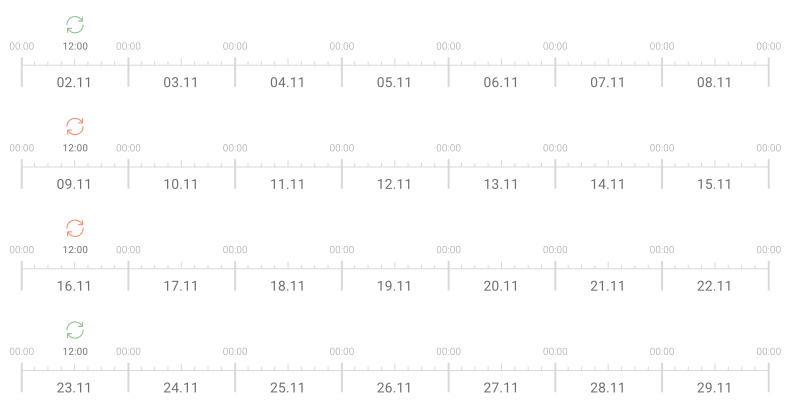
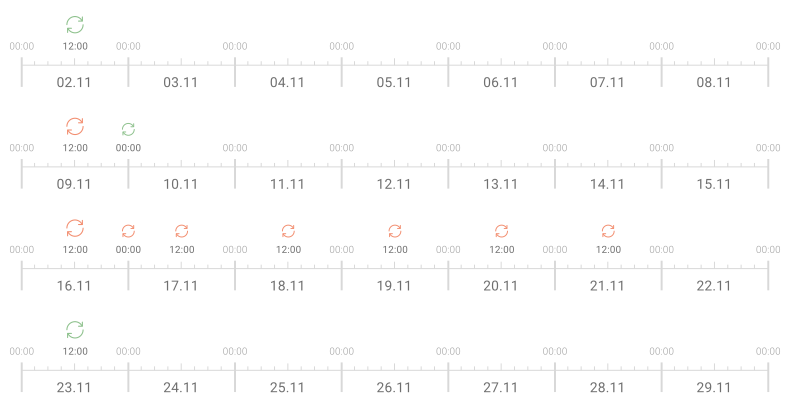
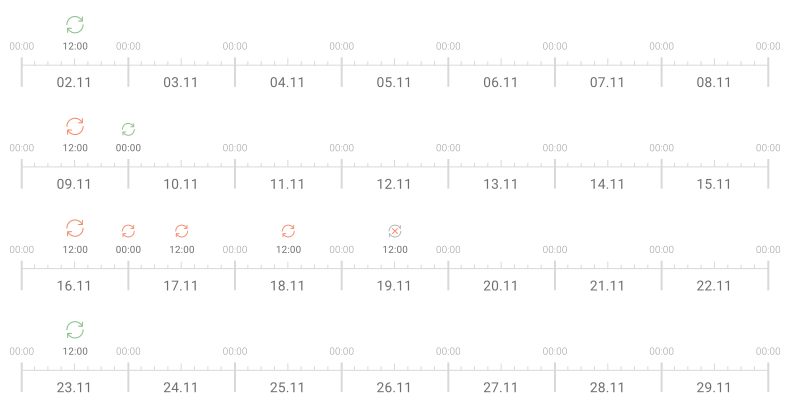
Suppose within a specific COF purchase automatic debitings are initiated on Monday at 12:00 and, according to the schedule, are to be performed on November 02, 09, 16, and 23, but on November 09 and 16 scheduled debitings do not occur, then the options to respond to this situation can be as follows:
- If the functionality of debiting retries is not available for this purchase, then regardless whether the scheduled debiting was completed or declined after the declined scheduled debiting, the next scheduled debiting will be performed.
- If the functionality of debiting retries is available for this purchase, then after the initial scheduled debiting is declined, the platform will retry it as many times as determined by the schedule follows: the first two attempts will occur with a delay of 12 hours between them, the following attempts will occur every 24 hours, and the attempts will be stopped at least 24.5 hours before the next scheduled debiting on Monday.
- If the functionality of debiting retries is available for this purchase, and the web service requests to stop subsequent debiting retries after three attempts are declined one after another, then if the initial debiting is declined, the platform will retry it up to three times in a row.
Since schedules of both regular COF purchases and debiting retry attempts can be flexibly configured, these scenarios can be used in a wide range of situations. However, it is also important to monitor statuses of all operations and maintain appropriate communication with customers depending on the operation statuses and retry schedule.
Workflow
The steps of the debiting retry procedure are as follows:
- When a scheduled debiting is initially declined by the payment system or the issuer, the Flashpay payment platform checks if there is a possibility to retry the debiting once again. If this possibility is confirmed, the web service is sent a callback that contains the information about the declined debit operation with the
declineoperation status as well as the scheduled date and time of the retry attempt. - At the scheduled time, the debiting retry attempt is performed automatically.
- Depending on the attempt result, the following steps are executed:
- If the attempt results in debiting the funds from the customer to the merchant, a callback containing the debiting result information (with the
successoperation status ) is sent to the web service. The COF purchase series continues according to the existing schedule. - If the attempt results in decline and the payment platform confirms the possibility to perform another attempt, a callback containing the information about the debiting decline (with the
declineoperation status and the scheduled date and time of the next retry attempt) is sent to the web service. Then step 2 is repeated. - If the attempt results in decline and the payment platform does not confirm the possibility to perform another attempt, a final callback containing the information about the debiting decline (with the
declineoperation status and without information about the next attempt) is sent to the web service. The COF purchase series continues according to the existing schedule. In this case, whether an additional debiting should occur or whether the series of debit operations should be cancelled must be decided by the merchant.
- If the attempt results in debiting the funds from the customer to the merchant, a callback containing the debiting result information (with the
The general workflow of this procedure is as follows.
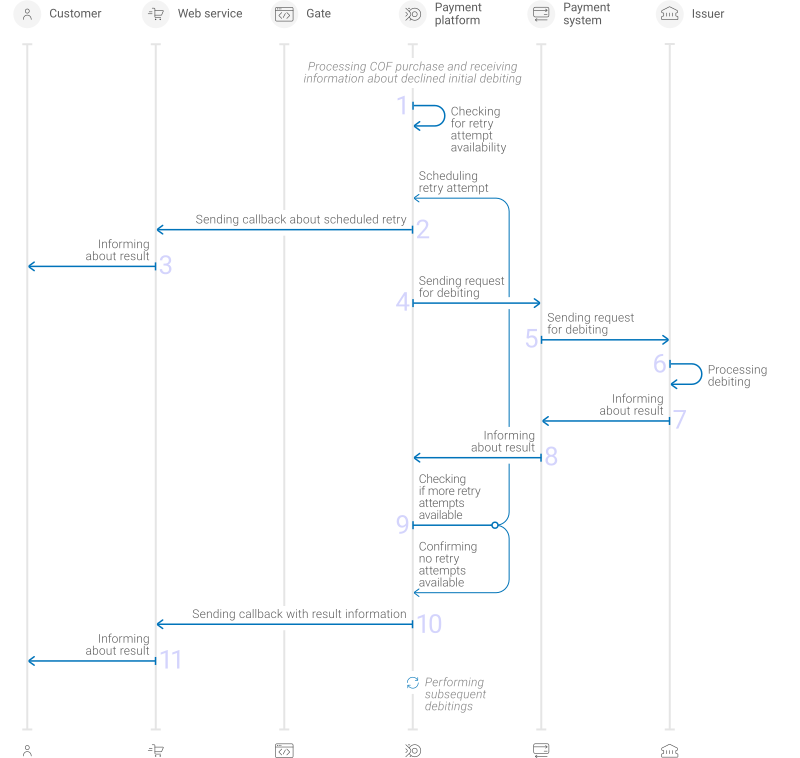
- If a scheduled debiting has not initially resulted in transferring of funds, the payment platform checks if there is a possibility to retry debiting.
- The payment platform sends a callback to the web service containing the information about the debiting decline (with the
declineoperation status ) and the scheduled date and time of the retry attempt. - The web service informs the customer that the debit operation was declined and a retry attempt is scheduled.
- The payment platform sends a request to perform a debit operation to the payment system on the scheduled date and time.
- The payment system processes the request and forwards it to the issuer.
- The issuer processes the debit operation.
- The issuer sends a notification about the debiting result to the payment system.
- The payment system sends the notification about the debiting result to the payment platform.
- The payment platform checks if the retry attempt is needed and available. If necessary, the payment platform initiates subsequent retry attempts, and for each attempt, steps 2 through 8 are repeated.
- The payment platform sends a debiting result callback to the web service: with the
declineoperation status if none of the retries resulted in debiting orsuccessif one of the retries resulted in debiting. - The web service informs the customer about the debit operation result.
- From this point forward, the payment platform can initiate subsequent scheduled debit operations, with each following steps 1 through 11.
The format of callbacks used in this workflow is described below.
Setup
To set up the functionality of debiting retries:
- With your Flashpay account manager, discuss and agree upon setting up this functionality and whether testing is necessary.
- If you need testing, get notified by the Flashpay specialists that the functionality is ready for being used in test mode, test this functionality, and inform Flashpay that everything is ready to launch.
- Get notified by the Flashpay specialists that the functionality has been added and fully set up.
Monitoring debiting retries
The debiting retries are performed automatically in the payment platform, according to a schedule and the processing workflow. On the side of the web service, you need to monitor the retries and maintain appropriate communication with customers depending on the debiting operation results.
To monitor the schedule and execution of each retry attempt, you can use callbacks sent from the platform (details). In cases when retrying automatic debitings is enabled for the project, callbacks include the recurring_retry object that can include some or all of the following parameters:
trigger_operation_id—identifier of the debit operation that was retried. Specified when at least one retry attempt was performed.retry_count—the number of the retry attempts already used up (an integer from 1 to 7). Specified when at least one retry attempt was performed.next_retry_exists—an indicator that shows whether the next scheduled attempt is available. This parameter is set totrueif the debiting resulted in decline and there is an available retry attempt (the number of attempts and the time allocated for making them are not used up). In all other cases this parameter is set to orfalse. Specified in all cases.next_retry_date—the scheduled date and time of the next retry attempt. Specified when the next retry attempt has been scheduled.
The following example of a callback contains information that no retry attempts were performed or scheduled for one of the debit operations in the series. Such callbacks are sent if the debiting resulted in funds transfer when it was first initiated or retry attempts cannot be performed.
"recurring_retry": {
            "next_retry_exists": false
            }
The following example of a callback contains information that the declined debiting can be retried and the first retry attempt has been scheduled ("next_retry_exists": true). In this case, the identifiers of the debit operation and the retry attempt are not specified because no retry attempts have been performed yet.
"recurring_retry": {
            "next_retry_exists": true,
            "next_retry_date": "2026-01-21T16:58:02+0000"
            }
The following example of a callback contains information that the first attempt ("retry_count": 1) to retry debit operation 344589675 was declined and, as a result, the second attempt ("next_retry_exists" : true) has been scheduled for this debit operation at 2026-01-25T16:58:02+0000.
"recurring_retry": {
            "trigger_operation_id": 344589675,
            "retry_count": 1,
            "next_retry_exists": true,
            "next_retry_date": "2026-01-25T16:58:02+0000"
            }
The following example of a callback contains information that the second attempt ("retry_count": 2) to retry debit operation 344589675 have been completed and no subsequent retry attempts have been scheduled ("next_retry_exists" : false). This can be either the case that the funds were transferred from the customer to the merchant (then the operation status should be success), or that there are no available retry attempts left as they have been used up without actual transfer of funds (then the operation status should be decline).
"recurring_retry": {
            "trigger_operation_id": 344589675,
            "next_retry_exists": false,
            "retry_count": 2
            }
Cancelling retries
To cancel retrying a specific debiting via the Gate API:
- Send an HTTP-POST request to the endpoint.
- Receive a synchronous response communicating that performing the subsequent retry attempts has been cancelled.
Keep in mind that these requests are processed according to the synchronous model of interaction between the web service and the payment platform. This implies that each such request is fully processed within one HTTP session. The response to the correct request contains the required data (details). The description of the response format can be found here.
The full sequence of processing request to cancel retry attempts is provided below.
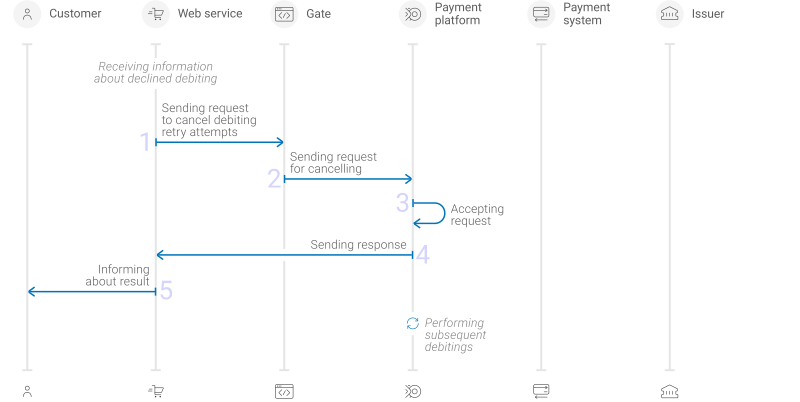
- The web service sends to the Flashpay URL a request to cancel the retry attempts scheduled in the payment platform for the declined debiting.
- The request enters the payment platform.
- The payment platform processes the request and ceases to retry this debiting.
- The payment platform sends a response with the request processing result to the web service.
- The web service informs the customer about the debiting result.
- The payment platform initiates subsequent debit operations according to the existing COF purchase schedule.
Each request to cancel retrying the specific debiting must include the following objects and parameters:
general—object with general request identification information:project_id—project identifier obtained from Flashpay during integration.signature—request signature generated after all required parameters are specified (details—in the article Signature generation and verification). (details)
recurring—object with the COF payment information:id—identifier of the debit series received in the callback with the COF purchase registration data or assigned when the COF purchase information was migrated from another acquirer.
trigger_operation_id—identifier of the recurring debit operation for which you need to cancel retries.
Thus, a correct request to cancel retries must contain the project identifier, signature, and the identifiers of the debiting series record and the relevant debit operation.
{
  "general":{
    "project_id":42,
    "signature":"K5D/anjn7fv+YyilUwS=="
  },
  "recurring":{
    "id":1079
   },
  "trigger_operation_id":092384
}
{
  "general":{
    "project_id":42,
    "signature":"K5D/anjn7fv+YyilUwS=="
  },
  "recurring":{
    "id":1079
   },
  "trigger_operation_id":092384
}
When the request to cancel debiting retries is processed, the payment platform sends a response with the code 200 OK to the web service. If the request is declined, the response contains a request processing status error and the description of the error that occurred.
Useful links
The following articles can be useful when working with debiting retry attempts:
- Monitoring and performing payments—about working with payments via Dashboard, including working with regular COF purchases and managing attempts to retry debit operations executed as part of regular COF purchases.
- COF purchase with automatic debiting—about processing regular COF purchases via Gate, including general information, description of processing workflows and data formats for working with standard card payments.
- Interaction concepts—about interacting with the payment platform via the Gate API, including description of interaction workflows and general requirements to data formats.
- Handling callbacks—about working with callbacks that allow receiving up-to-date information significant for processing of each payment, including description of callback types and data formats.
- Signature generation and verification—about the procedure of generating and verifying signatures in requests and callbacks in the process of interacting with the platform.